It’s a Big One!

I presume I will be offline for a short period later today when the updated version (PHP 8.4.27 ) is available – This won’t affect the station.

I use DreamHost:
“Our Operations team has implemented protections against the PHP remote code execution vulnerability across all our hosting platforms, including shared, VPS, DreamPress, and dedicated. These protections are active now, and we have not observed any attack traffic related to this issue to date.”

Critical PHP vulnerabilities expose vast majority of websites to potential compromise
Government agencies urged organizations to take their sites offline until they could be fixed.

The PHP project has announced a security release that fixes two critical security vulnerabilities discovered in PHP.


WordPress.org
Active Incident

Due to the critical severity of the issues, site owners are encouraged to immediately update their installations of PHP. Your web host may already be working to update PHP and put web application firewall (WAF) rules in place to mitigate the vulnerabilities, but you should still check for updates from your web host and, if necessary, update PHP as soon as possible.

Within WordPress, you can see which version of PHP your site runs under Tools > Site Health > Info > Server. Many web hosts provide this information in your web hosting administration panel too.

These vulnerabilities are not specific to WordPress and affect any server that hosts a PHP application. No WordPress update is required or planned for these issues.

Versions of PHP prior to 8.2 no longer receive security updates from the PHP project.

If your site runs a version prior to this and you manage your own web hosting, you should consider taking your server offline while you prepare to update to a newer version of PHP. This advice is being published by several national cyber security agencies. To quote the UK National Cyber Security Centre:
Where immediate remediation is not feasible, organizations should consider taking the system offline until it can be fully mitigated.


BreamHost
PHP Security Vulnerability: Protections Are In Place


October 21, 2026 10:59PM PDT

MONITORING
We have successfully completed the deployment of the official PHP security fixes across a large portion of our hosting infrastructure. For our remaining environments, our Operations Team is currently staging packages and running final stability tests to ensure a smooth transition. The mitigations we deployed earlier remains enforced, keeping your sites secure while we complete this final phase. No action is required on your end. We will provide another update once the full rollout has concluded.

October 21, 2026 1:43PM PDT
MONITORING
We’re continuing to roll out PHP’s official fix across all servers and expect it to be complete soon. Sites on PHP 8.1 and older are protected by the mitigations we deployed early, before the details were public. Security fixes for these versions, provided under our PHP Extended Support program, are being built and are expected to roll out within the next day. No action is needed on your end. We’ll keep you posted and share another update as soon as the rollout is complete.

October 21, 2026 12:55PM PDT
MONITORING
We are continuing to roll out PHP updates across all servers and PHP versions. Our systems remain closely monitored as the final updates finish deploying, and we will share our next update once the deployment is complete.

October 21, 2026 9:04AM PDT
MONITORING
We are currently rolling out PHP’s upstream fix fleet-wide. Known attack vectors and confirmed exploit paths across all PHP versions remain closed. Additionally, our Web Application Firewall (WAF) is actively blocking any incoming exploit attempts. We will continue to monitor systems closely as the final upstream fixes finish deploying. The next update will be provided once the fleet-wide deployment is fully complete.

October 21, 2026 6:46AM PDT
MONITORING
Our Operations team has implemented protections against the PHP remote code execution vulnerability across all our hosting platforms, including shared, VPS, DreamPress, and dedicated. These protections are active now, and we have not observed any attack traffic related to this issue to date. Patched PHP versions are being released today. Our Technical Operations team is ready to deploy updated PHP builds as soon as they are available. We’ll share another update once the patched builds are available.


Radio, Live Transmission

Joy Division
Transmission – BBC2 – Something Else (September 15, 1979) – 3:12

Ian Curtis

Posted on YouTube by
Joy Division

For the next few days I’m going to be running some audio tests – repeating songs and blocks from time to time. The songs/blocks have different settings/adjustments and I’ll be recording the streams on my end and then analyzing them using AI.

There are 3 areas I’m working on – Replay Gain which is basically loudness normalization. With the variety of music played, a rough estimate of the “loudness” difference between songs (soft to loud) in the streaming library is about 10-15 dB. The basic idea is to set up a baseline where you can find a middle and run from that. I’m going to be setting up 3 different baselines which is an experiment but I think it will work.

(ETA – Didn’t need to, I ended up working with -14 across the whole library)

Headroom – The current Replay Gain settings you’re hearing right now are in the middle of the three levels I’m looking at (I want to go a bit higher for most of the library), and using them I was able to cut the true peak headroom down to .5dB which is pretty tight.

Peaking/Clipping- At the current settings the headroom is pretty good for most of the songs and increasing it would be a mistake, however about 2.5% of the library is too hot (rough estimate) and is going over the headroom. Lowering the Replay Gain level on those will help out
significantly but there will still be some songs that need manual corrections and I’m working on that.

I’m finding it pretty interesting, I’ve been using AI to scan the library – this is what it looks for:

  1. Integrated loudness (LUFS)
  2. True peak level (dBTP)
  3. Peak headroom
  4. Amount of gain needed to reach the target LUFS
  5. Whether that gain would push the track above the true-peak ceiling
  6. Amount of peak reduction needed to prevent clipping
  7. Tracks that are unusually loud
  8. Tracks that are unusually quiet
  9. Overall loudness range across the library
  10. Distribution of tracks above and below the target
  11. Files that cannot be analyzed correctly
  12. Missing, damaged, or unreadable files
  13. Before-and-after values for tracks selected for correction
  14. Confirmation that corrected tracks meet the loudness and peak limits

ChatGPT-5.6 Sol.

And then when I upload the recorded blocks to AI it checks:

  1. Integrated and short-term loudness (LUFS)
  2. True peak levels (dBTP)
  3. Clipping or near-clipping
  4. Dynamic range
  5. Crest factor
  6. Song-to-song volume differences
  7. Changes to loud transients
  8. Limiter activity and peak reduction
  9. Effects on quieter passages
  10. Differences introduced by the broadcast chain and MP3 encoding

ChatGPT-5.6 Sol.

It’s all numbers – AI isn’t looking at wave forms, analyzing the actual music or anything like that. It’s just looking at numbers and measurements.
– David

Web Design for Accessibility

Leroy Anderson
The Typewriter (Composed 1950 – 1st performance 1953)

The Typewriter Performance · Image of man typing, really gets into it.

Posted on YouTube by
Aleksandr Trofimov

I’ve been setting up the site for keyboard accessibility and ran into a problem on Safari. Using the tab button on the keyboard, the sidebar was being skipped. Turns out in Safari Settings in the Advanced Tab you have to check the box “Press Tab to highlight each item on a webpage”. The navigation works fine in Firefox, Chrome and Edge by default.
Safari Settings>Advanced Tab>Check Box – “Press Tab to highlight each item on a webpage”

As I was going through sources to add to this list of links it became a rabbit hole. I’m scoring 94-100 on Google PageSpeed insights for accessibility, which is a good start for basic settings. On some of the sites I looked at though (which had paid services coincidentally) I scored pretty bad – one of them even said my site was breaking the law, WTF.

I’ve tried to list the most helpful free sites.
— David

Resources
Microsoft – Accessibility/Disability Support
Apple Accessibility Features
AbilityNet – Digital Accessibility Free Resources
ADA – Fact Sheet – Web Content and Mobile Apps

Tools
Google PageSpeed Insights
Wave – Web Accessibility Evaluation Tool
W3 -Web Accessibility Evaluation Tools List
A11Y – Checklist

axe DevTools Browser Extensions
Firefox
Chrome
Edge

Web Design and Site Info > Accessibility > Web Design for Accessibility – Link Dump

Resources
• Microsoft – Accessibility/Disability Support
• Apple Accessibility Features
• AbilityNet – Digital Accessibility Free Resources
• ADA – Fact Sheet – Web Content and Mobile Apps

Tools
• Google PageSpeed Insights
• Wave – Web Accessibility Evaluation Tool
• W3 -Web Accessibility Evaluation Tools List
• A11Y – Checklist

axe DevTools Browser Extensions
• Firefox
• Chrome
• Edge

We Have the Technology – Website Info

We have the technology
Not available before
We have the technology

But thinkers and poets of the past
Oh, no
They had to leap into the dark so blindly
— David Thomas

Pere Ubu
We Have The Technology (1988)

Man pushing button, looks serious

Posted on YouTube by
Dzhakhar 96

Changes to the site (other than style):
On the Desktop, Tablet/iPad (landscape mode) will pretty much be the same.

On a phone, the Home Page is just the sidebar without the center content.
The sidebar has a list of the Recent Posts now so they can be accessed from there. Anything else will be on the Archives Page.

The main thinking behind the changes was trying to make it easier on mobile phones to just listen to the station and see what’s playing. I’ve cleaned it up too, works a lot better.

Still working on a few quirks, but it’s more or less back to normal.


— David

Hello world! – Website Info

The Beatles
Get Back (January 30, 1969)

Beatles Performing Get Back on Rooftop

Posted on YouTube by
jose navea

Under Construction – I’ve been having issues with a few things on the site. Add-ons were conflicting with each other and I need to move away from proprietary page builders that lock you in. Their support is generally substandard.

I’ll name and blame – Elementor – For any ticket you send in they want your login info or it won’t be submitted, I had a question over the file system and in the ticket I explained that I had a backup on my computer that I was working with so I didn’t need anything done on the site. Just an answer to my question.

Their response was that they were unable to log in and asked for my info again (I put fake login info in the ticket). I’m reluctant to let anyone poke around to begin with and this was back when I was working on syncing with eBay and had customers names and addresses, I’m not giving that out.

As far as locking you in, to rebuild your site it’s a huge pain in the ass. It uses its own proprietary markup and database entries which can break the site and leave content and metadata after uninstalling. I nuked the site and am doing a fresh install.

I’m currently using the basic WordPress with Gutenberg blocks and it uses HTML markup, and can be moved to other platforms without a hitch. It can be easily converted to basic markup, plain text, rich text and so on.

— David

ETA – The Now Playing and Previously Played Archives are a priority.

DNS Propagation – Website Info

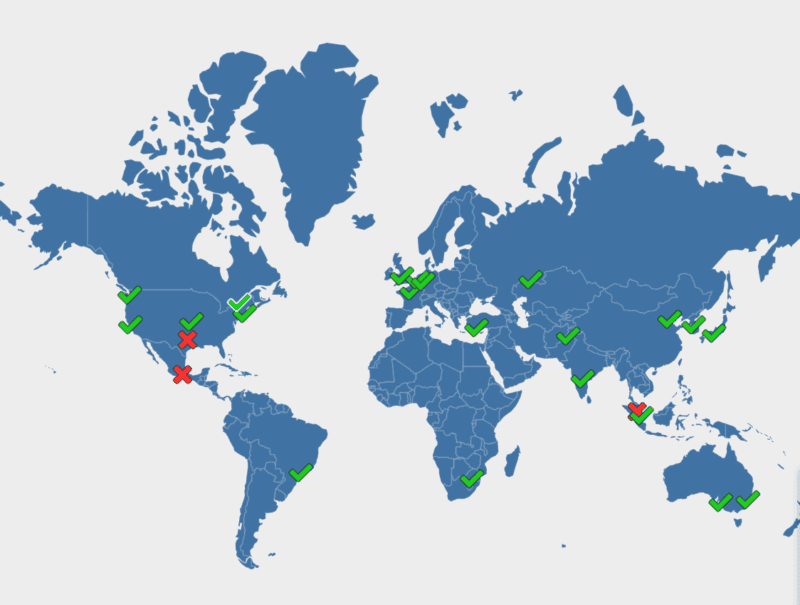
Currently, the site has been having some issues, it was moved to a different server and it takes up to 48 hours for the DNS Records to make their way around the world. Hasn’t cleared here, should be fine for most everyone else.

DNS Propagation map showing Dallas not set up with a big X on it

There’s a big X right over Dallas, I can feel it.

DNS Checker – DNS Check Propagation Tool – dnschecker.org
DNS Propagation Checker – Global DNS Testing Tool – whatsmydns.net
DNS Propagation Checker: Real-time Global DNS Status – Site24x7.com
DNSMap – Worldwide DNS Propagation Checker – Global test – dnsmap.io
DNS Lookup – dnslookuo.io
For North Texas Radio – whatsmydns.net

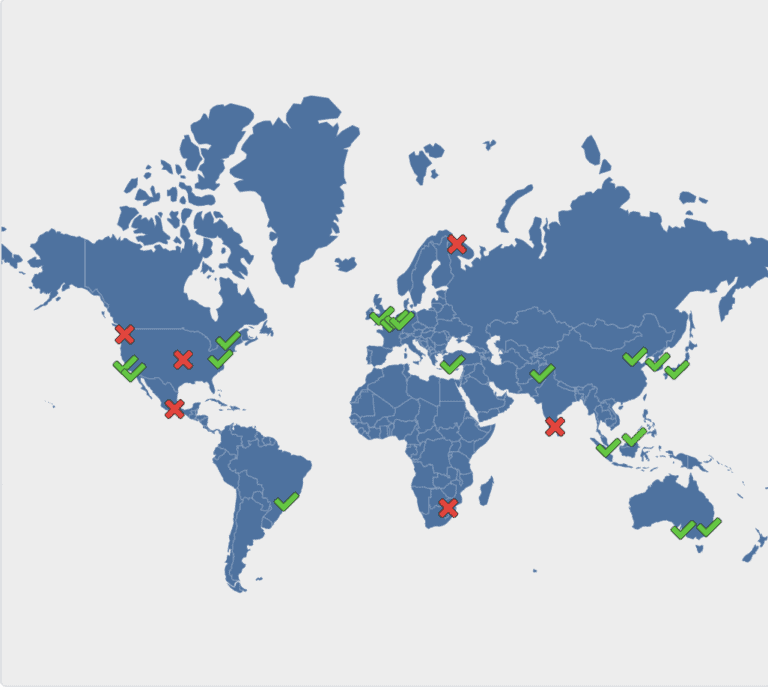
DNS Propagation map, more areas shown lacking coverage then before

ETA – It changes quickly with red Xs popping up here and there, then turning in into green and others turning red, it’s not as smooth as I thought. I figured it would be like a wave. This is a few hours later but it will be completely different in a minute.
— David